FREE RESOURCE · TECHHOWGRID
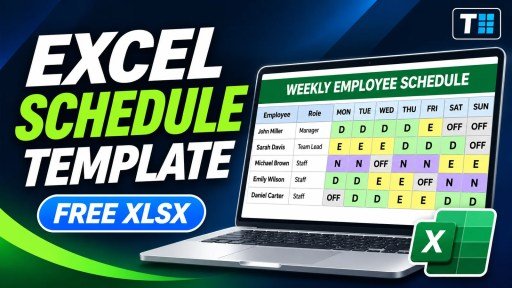
Plan employee shifts for an entire week with this free, editable Excel schedule template. Assign day, evening, night and half-day shifts, track scheduled paid hours and see how many employees are scheduled each day.
- Weekly shifts and staffing counts
- Automatic planned paid hours
Free XLSX workbook · No macros · No account required.
Template preview
Explore the original workbook’s four worksheets using selected cell values. The tables are HTML excerpts, not screenshots.
Inside the workbook
| Employee | Role | Mon | Tue | Wed | Thu | Fri | Sat | Sun | Paid hours | Shifts |
|---|---|---|---|---|---|---|---|---|---|---|
| Employee | Role | Mon | Tue | Wed | Thu | Fri | Sat | Sun | Paid hours | Shifts |
|---|---|---|---|---|---|---|---|---|---|---|
| Alex Morgan | Supervisor | D | D | D | D | D | OFF | OFF | 37.5 | 5 |
| Jamie Lee | Associate | E | E | OFF | E | E | E | OFF | 37.5 | 5 |
| Taylor Chen | Support | N | N | N | OFF | OFF | N | N | 37.5 | 5 |
| Sam Rivera | Associate | H | D | D | LV | D | OFF | OFF | 26.5 | 4 |
| Code | Shift name | Start | End | Unpaid break (min) | Paid hours |
|---|---|---|---|---|---|
| D | Day | 09:00 | 17:00 | 30 | 7.5 |
| E | Evening | 14:00 | 22:00 | 30 | 7.5 |
| N | Night | 22:00 | 06:00 | 30 | 7.5 |
| H | Half day | 09:00 | 13:00 | 0 | 4 |
| OFF | Day off | 0 | 0 | ||
| LV | Leave | 0 | 0 |
| Step | Action |
|---|---|
| 01 | Set the week start |
| 02 | Customize shifts |
| 03 | Assign employees |
| 04 | Review totals |
| 05 | Reuse or print |
| 06 | Check exceptions |
Selected rows and columns are shown. The downloaded workbook includes the complete editable worksheets.
What’s included in the Excel schedule template?
- Start Here: instructions for setting up and reusing the workbook.
- Shift Setup: customize start times, end times and unpaid break minutes.
- Weekly Schedule: blank editable roster for up to 20 employees, with shift dropdowns.
- Example: a completed sample roster to demonstrate the calculations.
How to create a weekly employee schedule in Excel
- Open the workbook and enter the Monday date in cell B4 of Weekly Schedule.
- Customize the standard shift times in Shift Setup; leave the shift codes unchanged.
- Enter employee names and roles, then select one shift code per day.
- Review daily staffing counts, individual paid hours and team totals.
- Save a copy for the next week, or print in landscape orientation with all columns fitted to one page wide.
Shift codes and working hours
D = Day, E = Evening, N = Night, H = Half day, OFF = Day off, LV = Leave. Paid hours are calculated from the shift duration less unpaid breaks. Overnight shifts are supported; the template assumes one shift per employee per day. The roster is for planned hours, not attendance or payroll compliance.
Example weekly schedule
The included sample roster covers four employees and 19 shifts, totaling 139 scheduled paid hours. For example, five day shifts from 9:00 AM to 5:00 PM with a 30-minute unpaid break total 37.5 paid hours. The overnight shift runs from 10:00 PM to 6:00 AM and also totals 7.5 paid hours after the break.
Keep a separate workbook for each week. For actual attendance records rather than planned shifts, use our free monthly Excel attendance sheet.
Frequently asked questions
Is the Excel schedule template free? Yes. Download the XLSX workbook and customize it in Excel.
Can I change shift times? Yes. Edit the start and end times and break minutes in Shift Setup.
Can I schedule more than 20 employees? The supplied roster supports 20 rows. To expand it, extend the formulas, validation and totals ranges consistently.
Does this calculate overtime? No. It calculates planned paid hours and shift counts, not overtime or payroll.
More free Excel resources
Explore our free Excel templates and tools or learn spreadsheet skills with our Excel guides.
Download your free resource
Get the complete file and start using it today. No account required.
File information
Excel (.xlsx)
- File size
- 11.8 KB
- Contents
- 4 worksheets · Editable
- Compatibility
- Microsoft Excel recommended.
- Macros
- No macros included
- File published
- 28 Nov 2026
- Access
- Free · No account
Features, formatting and formulas may behave differently in other spreadsheet apps. Open in Microsoft Excel for the intended experience.
Explore more free tools and downloads.