
Create professional invoices with TechHowGrid’s free editable Excel invoice template. Enter your business and customer details, quantities, unit prices, discounts and tax rate. Built-in formulas calculate line totals, invoice total and balance due automatically.
What is included in the invoice template?
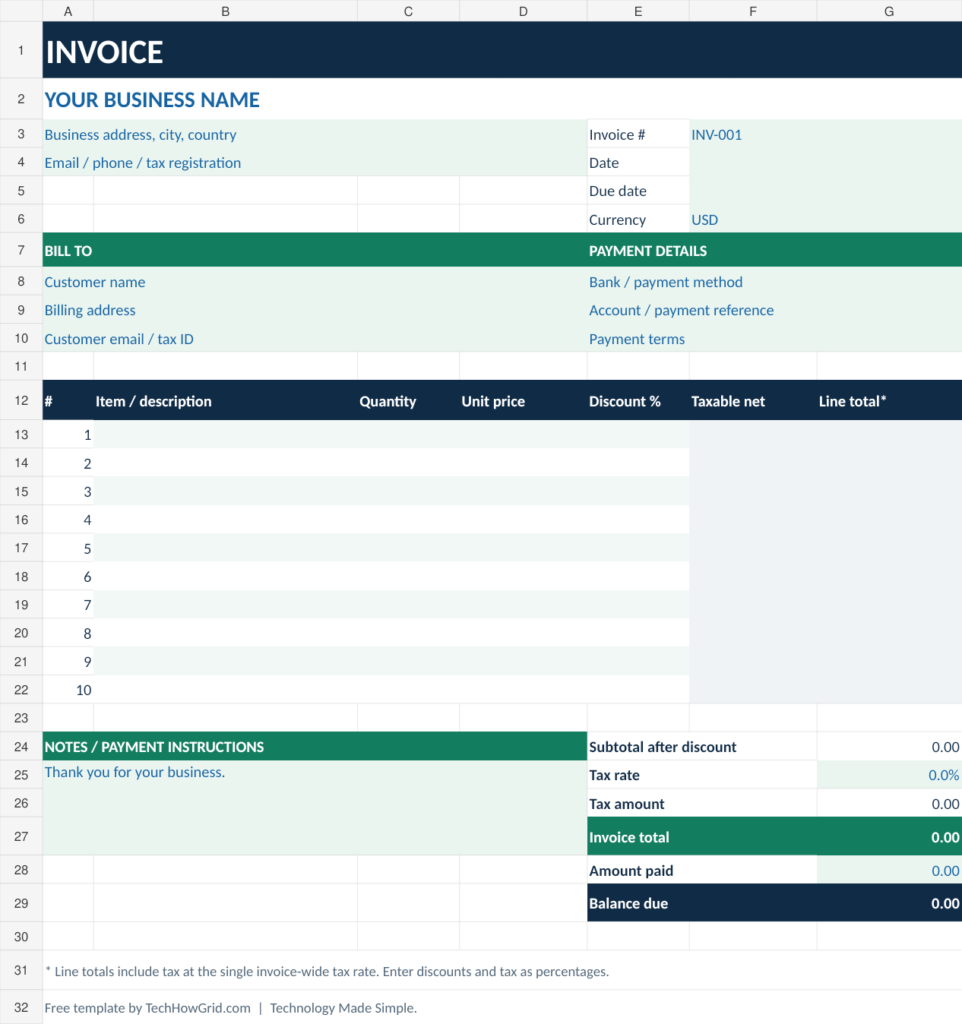
An editable invoice sheet with 10 item lines, business and customer details, invoice number, dates, currency, payment instructions, percentage discounts, a customizable invoice-wide tax rate, amount paid and balance due. An Instructions worksheet explains how to use and print the workbook.
How to create an invoice in Excel
- Save a fresh copy of the workbook for each invoice.
- Replace the business and customer placeholders and enter invoice details.
- Enter quantities, prices and any percentage discounts.
- Enter the applicable tax percentage and amount paid.
- Review the totals and print the Invoice worksheet, fitting it to one page if needed.
How automatic totals work
Each line’s taxable net equals quantity multiplied by unit price, less the percentage discount. Tax is applied to each discounted line and rounded to two decimal places. The workbook sums the line totals and subtracts the amount paid to calculate the balance due.
Currency, taxes and compatibility
The default currency label is USD and the tax rate is 0%. Change both to suit your business. Use one currency and one tax rate per invoice. The workbook is a general-purpose template, not a jurisdiction-specific statutory tax invoice; check local invoicing and tax requirements before issuing it.
More free Excel downloads
Explore our Free Tools & Downloads, including the Excel Formula Cheat Sheet and 2027 Excel Calendar.